How to turn on the proximity alert
Your card shows up on the iPhone lock screen when the customer walks by your shop.
All plans
⏱ 3 minutes
Where: More → Proximity
-
1
Open More → Locations and go into your location.
-
2
Standing in your shop, tap Use my current location, or paste the latitude and longitude from Google Maps. Tap Save.
-
3
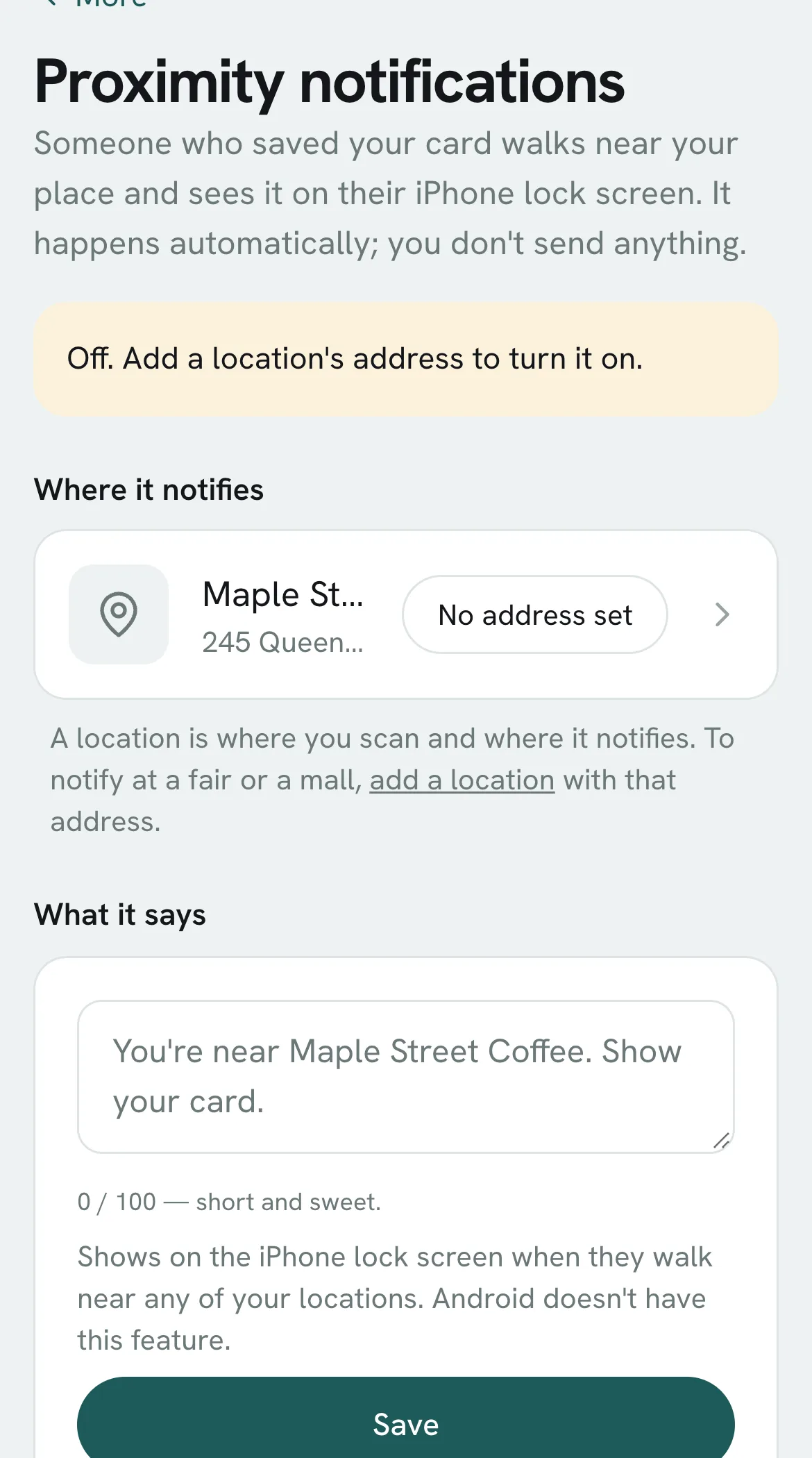
Open More → Proximity: your location shows as active.
-
4
Under What it says, write the message (100 characters max) and tap Save. If you leave it blank, it says your business name with a reminder to show their card.
What if…?
Does it work on Android?
No. It's an Apple Wallet feature, iPhone only. Everything else works the same on Android.
How close do they have to be?
The iPhone decides, around 100 meters.
Do I have to send it?
No. It shows up on its own whenever they're nearby; you don't send anything.
Can I use it at a market or fair?
Yes: add a location with the market's location.
You might also need
How to send a notificationWrite it in 20 seconds and it lands on your customers' phone screens.
How to send a notification to a groupEveryone, no visit in N days, close to a reward, new customers or this month's birthdays.
How to tell if a notification workedEach notification shows how many customers came back in the next 7 days and how much they spent.